Is AI Taking Your Website Traffic? How to Tell
 Written by Tim Dailey, founder of Digital Gibberish
If your website traffic dropped, AI might be part of the reason, but it’s rarely the first thing to check. Rule out seasonality, broken tracking and ranking changes first. Then compare your impressions and clicks in Google Search Console, because that pattern shows whether people are seeing you and just not clicking.
Here is how to work through it in order, without needing to be an analyst.
Key takeaways
- Rule out seasonality, broken tracking and ranking changes before blaming AI.
- Steady impressions with falling clicks and a stable position in Search Console fits people seeing you but clicking less.
- One Pew study found people clicked a result link in 8% of visits with an AI summary versus 15% without. It covers Google only.
- Judge by calls and form fills, not just visits.
Is AI actually reducing clicks?
There’s real evidence that it can. A Pew Research Center study tracked the browsing of 900 U.S. adults in March 2025. When a Google results page showed an AI summary, people clicked a regular result link in 8% of visits. When it didn’t, they clicked in 15% of visits. About 18% of the searches Pew looked at produced an AI summary.
That is one study, covering Google only, from one month. It supports the worry, but it doesn’t tell you what’s happening to your site. That takes your own data.
Step 1: Compare the right months
Local businesses are seasonal. A landscaper’s traffic falls in winter. A tax preparer’s peaks in spring. Compare this month with the same month last year, not with last month.
Step 2: Check that tracking still works
Plenty of “traffic drops” are measurement problems. Check that:
- Your analytics tag is still on every page, especially after a redesign or a new plugin.
- The measurement ID is the right one.
- The Realtime report in Google Analytics shows you when you visit your own site.
If you recently changed your site address, added a redirect, or removed pages, that can move traffic around too.
Step 3: Read Search Console
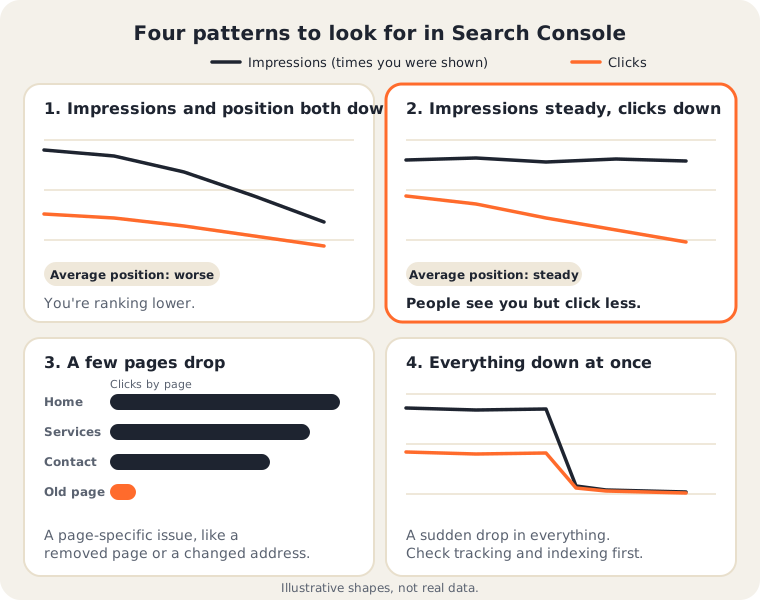
Google Search Console is free and shows how your site performs in Google search. Open the Performance report and compare two date ranges, then look at four numbers:
| What you see | What it usually means |
|---|---|
| Impressions down, average position down | You’re ranking lower. Competition, a site problem, or a ranking change. |
| Impressions steady, clicks down, position steady | People still see you but click less. AI answers, maps and ads may be taking the space. |
| Drop on a few pages only | A page-specific issue, such as a removed page or a changed address. |
| Everything down at once | Check tracking and indexing before blaming AI. |
Google counts traffic from its AI features in the normal Performance report, and its guidance on AI features says sites appearing in them are included in the overall search traffic, under the Web search type. The page doesn’t describe a separate filter, so don’t count on a line labeled “AI.” You read the pattern.
Step 4: Look beyond your website
Many local customers never reach your site. They see your Google Business Profile, tap the phone number, or ask for directions. If your profile is suspended or unverified, you lose that traffic completely, and your website numbers won’t show why. Check that your profile is visible and accurate, and our guide on why a business isn’t showing up on Google Maps covers the common problems.
Step 5: Then test AI directly
If the pattern points to AI, check whether assistants mention you. Our 15-minute test for ChatGPT, Gemini and Perplexity shows how, and how to see AI traffic in Google Analytics shows what, if anything, they send you.
What to do about it
- Keep the SEO basics strong. Google says there are no extra requirements to appear in its AI features, and that the usual fundamentals remain worthwhile.
- Measure what matters. Calls, directions and form fills matter more than visits. Fewer clicks doesn’t always mean fewer customers.
- Make your business easy to name. Clear pages, accurate details and real reviews help whether the customer searches or asks an assistant. We explain why in Why Small Businesses Need GEO, Not Just SEO.
Common questions
Is AI the reason my traffic dropped? It might be, but you can’t tell without checking your own data. Rule out the simple causes first, then read the pattern in Search Console.
How do I know if AI Overviews are hurting me? Look for steady impressions with falling clicks and a stable position. That pattern fits people seeing you but clicking less. It isn’t proof, but it’s a strong hint.
Should I stop doing SEO? No. The same fundamentals that help you rank also help in AI features, according to Google, and many customers still search the old way. See Is SEO dead?
What if my traffic and my leads are both down? Then something real is wrong, and it’s worth fixing whatever the cause. Check rankings, your Business Profile and your site first.
How soon will changes show up? There’s no fixed timeline. Treat this as steady upkeep, not a one-time fix, and compare month over month.
If you’d like help reading your numbers, a plain look at your site is where our work starts. Get in touch and we’ll tell you what we see.